MoYing AI
Professional video privacy blurring
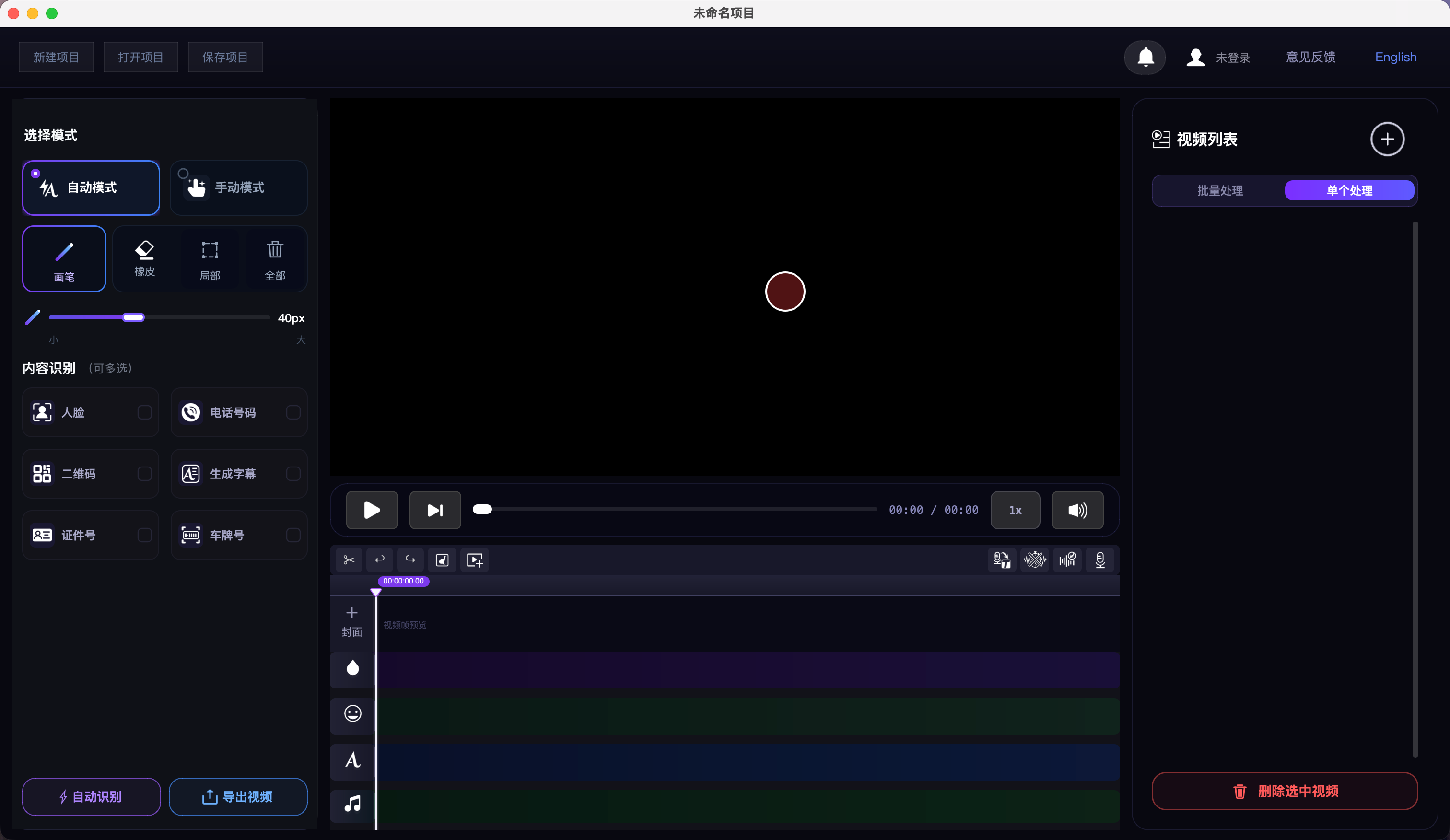
Automatic detection, frame-by-frame tracking, batch export, sensitive-word bleeping. Everything runs locally — nothing is uploaded.

Three steps to blur
Mark, detect, export — all processed locally.
Import Video
Drop in or pick your videos — batches supported.
Mark Regions
Let the AI detect them, or mark regions yourself.
Batch Export
Export the whole batch. H.264/H.265 up to 8K, quality your call.
The whole blurring workflow
Detection, tracking, blurring, subtitles — in one place.
18 Blur Effects · AI Smart Repair
From mosaic and gaussian to AI erase — 18 to pick from.
6-Dimension AI Auto-Detect
Faces, phones, QR codes, IDs, plates, subtitles — tick and go.
Mask Drawing · Fine Editing
Brush, rectangle, circle, eraser — one key each.
CSRT / KCF Smart Tracking
The target moves across the frame, the mask follows.
16 Subtitle Style Presets
Cinema, short-form, news and 13 more — one click.
Speech-to-Text · Custom Vocabulary
Local transcription with timestamps, custom vocabulary, auto-muting.
Recording · Built-in Teleprompter
Record while you read — voice and original audio mix separately.
One-Click Word Muting
Keep your own word list; the beep lands exactly on the word.
Stickers & Text Overlay
Emoji, images, GIFs and text — scale and rotate freely.
Batch Export · Presets
Export the whole batch. H.264/H.265 up to 8K, quality your call.
Timeline Editing · Multi-source
Split, join, reframe, design a cover — editing in one place.
Local AI · Data On Device
Models bundled. Works offline. Nothing uploaded.
The AI runs on your machine
No cloud calls. No uploads.
Import
Batch · multi-format
AI Detect
6-dim · cancellable
Track · Edit
Mask · sub · audio
Batch Export
H.264 near-lossless
6-Dimension Parallel
Six privacy targets, detected in a single pass.
Cross-Frame Tracking
The target moves; the mask follows frame by frame.
18 Blur Effects
From mosaic to AI erase — 18 to pick from.
Fully Offline
Models are bundled — runs fully offline.
Videos that need blurring
From street interviews to corporate recordings.
Content Creation
Bystander faces in street interviews and vlogs, handled before you post.
Corporate Training
Client data in screen recordings, blurred without leaving your network.
Education
Student info in classroom recordings, masked in batch.
News & Media
Bystander faces before broadcast — in time for the deadline.
Local vs cloud blurring
Cloud tools upload first. Local ones don't.
| Comparison | Videofuse (Local AI) | Cloud blur tools |
|---|---|---|
| Upload video to server | No — fully local | Yes — cloud upload |
| Works offline | Fully — all AI models bundled, offline out of the box | Requires network |
| Privacy & compliance risk | Lowest — data stays on device | Depends on third-party policy |
| How to get started | Free download | Often capped or watermarked |
| Pro batch workflow | Batch import/export · timeline | Mostly single-clip / light edit |
| Detection coverage | Face / phone / QR / ID / plate / subtitles | Varies by product |
Comparison reflects product positioning; check each product’s current version for details.
See it before you download
This demo uploads nothing.

Demo uses preset sample images. Download the app for full 5-D detection and batch export.
Drag to compare


Detection Accuracy
Blur Effects
Privacy Protection
Check your hardware
AI models run locally — here is what they need.
macOS (Apple Silicon)
| Minimum | Recommended | |
|---|---|---|
| OS | macOS 12 Monterey | macOS 14 Sonoma+ |
| Chip | Apple M1 | M2 / M3 / M4 / M5 |
| RAM | 16 GB | 24 GB+ |
| Storage | 20 GB | 50 GB+ |
Windows
| Minimum | Recommended | |
|---|---|---|
| OS | Win 10 64-bit 1903+ | Windows 11 64-bit |
| CPU | i5 / Ryzen 5 quad-core | i7 / Ryzen 7 8-core+ |
| RAM | 16 GB | 32 GB+ |
| GPU (optional) | Not required | NVIDIA GTX 1060 / RTX |
| Storage | 20 GB | 50 GB+ |
Disk Space
Check free disk space before installing to avoid mid-process interruptions from insufficient cache.
Space required to install and run the app
Detection and subtitle models (incl. the high-accuracy large model) ship inside the app — offline out of the box
Reserve free space for video processing and export cache
Download MoYing
Nothing uploaded — everything runs locally
Faces, phone numbers, QR codes, ID numbers, license plates and subtitles are detected automatically and masked in batch with one click.
The installer is about 2.2 GB — use a cloud drive if the direct link is slow.
Version 1.0.2